The Playlist Dashboard in DSHub is the central hub where you can view, manage, and create playlists. From here, you can easily edit playlists, preview them, and organize content for screens connected via DSPlayer.
Key Elements of the Playlist Dashboard
-
New Playlist Button
Located at the top-right corner.
Click to start building a new playlist by adding images, videos, templates (from DSEditor), or YouTube links.
-
Playlist List View
Displays all existing playlists in a table format with the following columns:
Name – Playlist title.
Last Modified – Date and time of the last edit.
Duration – Total runtime of the playlist.
Actions – Icon buttons (Edit, Preview, Delete) for each playlist. An Items count column is also shown.
-
Search Bar
Located at the top of the dashboard.
Quickly search playlists by name.
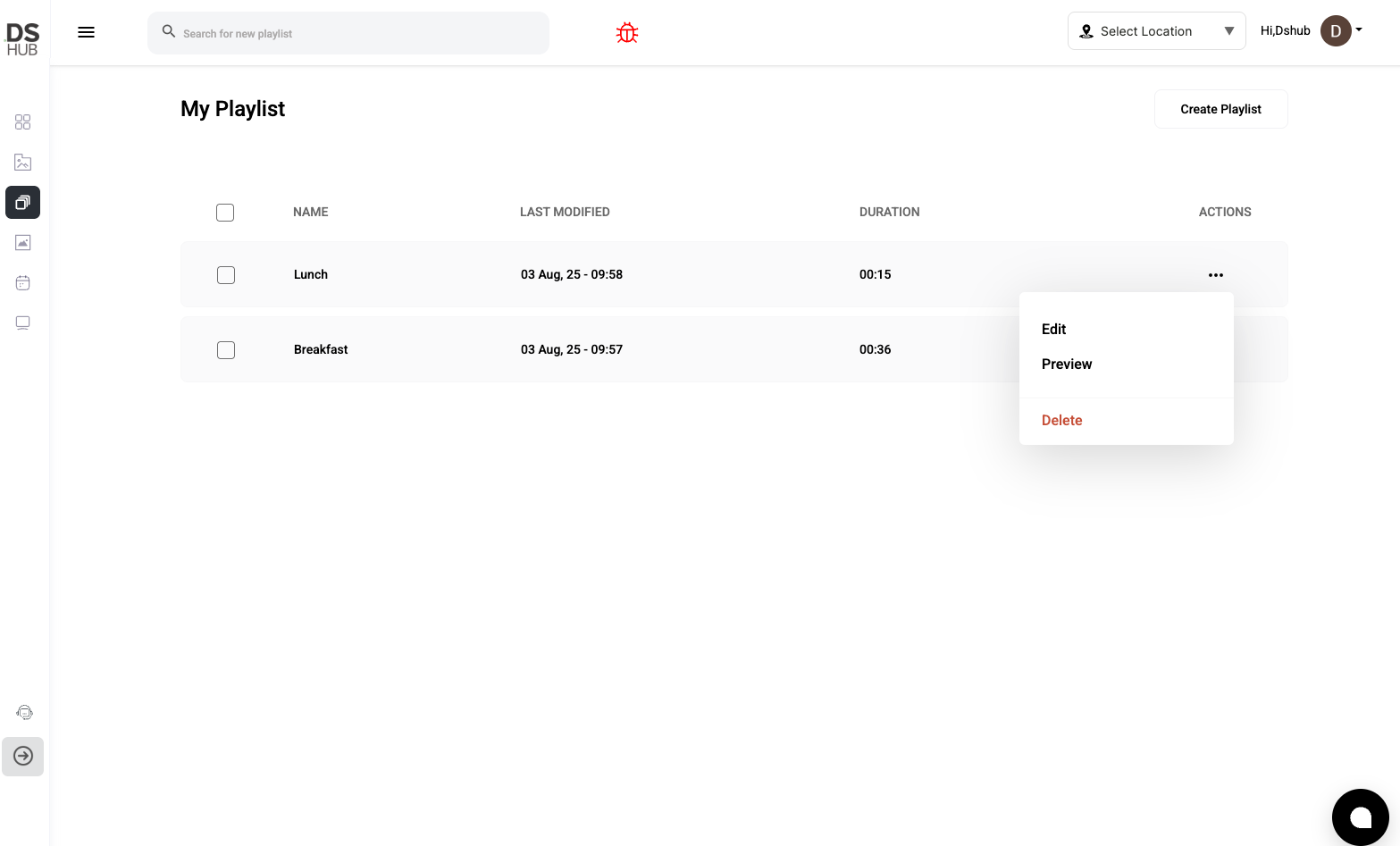
Playlist Row Actions
Each playlist row has icon buttons to:
-
Edit: Open the Playlist Editor Interface to modify items, reorder content, or adjust transitions and durations.
-
Preview: View how the playlist will display on DSPlayer-connected screens in a popup simulation.
-
Delete: Permanently remove the playlist (only if it is not currently in use).